AI smile preview to explain treatment before it starts
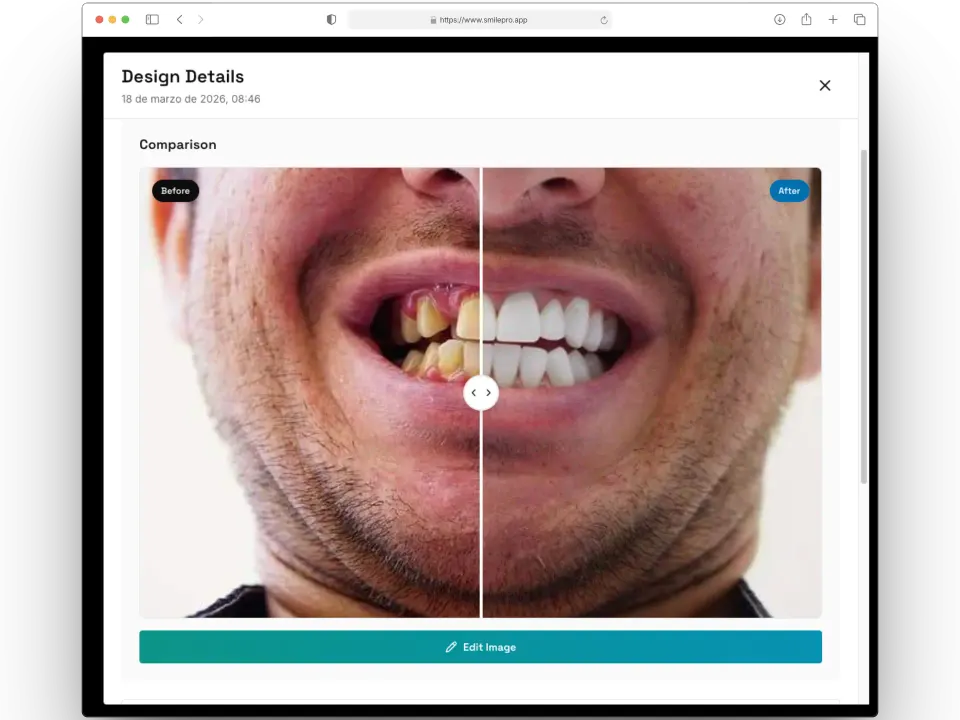
From a frontal photo of the patient, SmilePro generates in seconds a simulation of how their smile could look with veneers, clear aligners, All-on-X or whitening. You use it in the consultation to talk through the options, and it stays in the patient’s file.
Free plan · no credit card
Who it is for
For dentists working in cosmetic dentistry, rehabilitation or orthodontics who want the patient to understand the proposed change without relying only on verbal explanations or photos of other cases.
The simulation is a visual aid for the conversation. Diagnosis, treatment planning and informed consent remain the professional’s responsibility.
How it works
-
Upload the photo
A sharp frontal photo with the teeth visible. It is the biggest factor in realism: glasses, strong filters or a profile shot reduce it.
-
Choose treatment and style
The treatment type decides what changes; the style (natural, Hollywood or minimal) decides how far. Fine-tune with quick adjustments or free instructions before generating.
-
Assign the patient and generate
Every design belongs to a patient. If none is assigned, SmilePro asks for one and the generation carries on by itself. Each design uses one image credit.
-
Compare and use it
The detail view shows before and after side by side. From there you edit it, create a budget with the photos or build a short video.
What it includes
-
Image editor that does not spend credits
Paint a tooth shade, adjust brightness, contrast and saturation, annotate or blur. Every save is kept as a variant under the original design.
-
Budget with the before and after
Create a budget from a design: the before photo and the simulation go into the PDF you hand to the patient.
-
Video for social media
Turn a design into a short video with scenes, format, music and your logo. The MP4 is built on your computer (Chrome or Edge) and uses no credits.
-
From the clinical history
Inside a visit, the simulations block lists the patient’s designs and lets you generate a new one with the patient already assigned.
-
Gallery with filters and archive
Every design of the clinic, filterable by date, with active and archived kept apart so a case is quick to find.
Generated images are simulations. They do not predict or guarantee a clinical result, and you should ask for the patient’s consent before posting their photos.
Frequently asked questions
Which treatments can I simulate?
Veneers, clear aligners, All-on-X and whitening. For each one you choose a style (natural, Hollywood or minimal) and can add free instructions.
Does the simulation show the real treatment result?
No. It is an AI-generated image to support the conversation with the patient. The real result depends on the clinical case and the treatment the professional decides.
How much does each simulation cost?
Each design uses one image credit. Credits are bought in packs, work on both Free and Plus, and last 12 months. Editing a design or making a video from it uses no credits.
What photo gives the best results?
A frontal, sharp, well-lit photo with the teeth visible. Avoid glasses, strong filters and profile shots.
Related features
- Treatment plans and budgets
The plan lives on the odontogram across visits; the budget comes out of it with your brand, and payments are recorded in full or in instalments.
- Patients and clinical records
Patient files, the full clinical history on one page, prescriptions, orders and certificates with signature, and encrypted clinical text.
- Digital odontogram
Record diagnoses and procedures by surface, tooth, arch or whole mouth with FDI notation, and turn them into a budget.