Dental treatment plans and budgets with instalment payments
The professional decides the plan; SmilePro records it on the odontogram, follows it from one visit to the next and turns it into a branded budget. When the patient pays, you record the charge in full or in instalments and each payment gets its receipt.
Free plan · no credit card
Who it is for
For clinics that build quotes in Word or Excel, lose track of which procedures are already done, and answer “how much do I still owe?” by hand.
How it works
-
Record the plan
Mark the procedures on the odontogram. Each one carries a status: pending, in progress or done.
-
Generate the budget
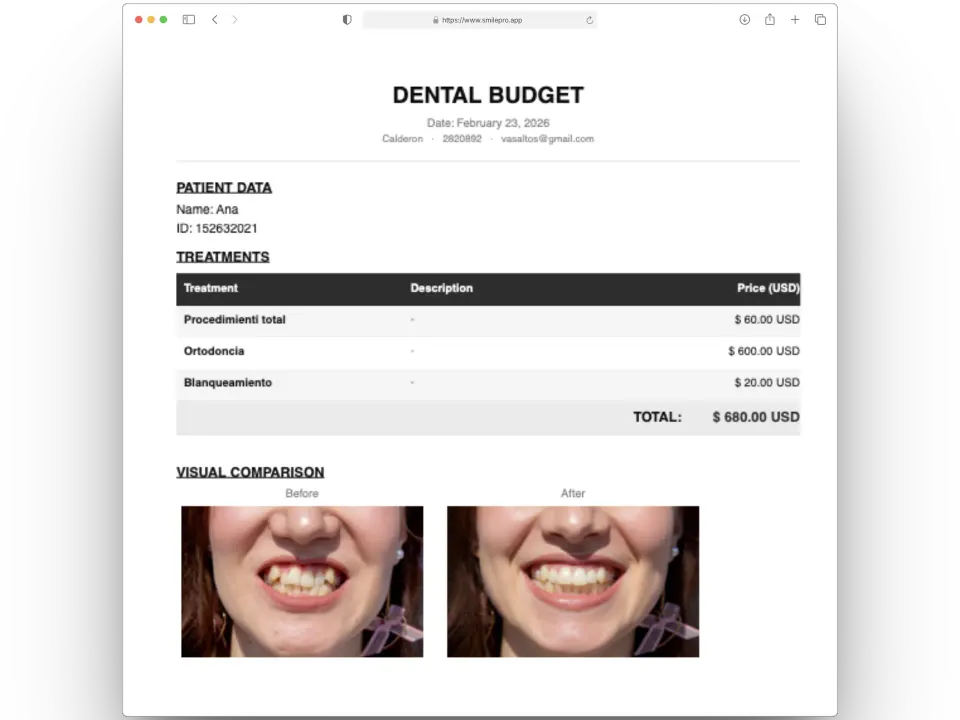
From the odontogram, from a smile simulation (with before and after photos in the PDF) or as a quick budget.
-
Adjust and hand it over
Per-line discounts, as an amount or a percentage, plus the patient’s insurance discount if they have one. Download the PDF with your logo.
-
Record payments
Full payment or 2 to 24 instalments, each charged in full or in part. Every charge produces a numbered receipt.
What it includes
-
The plan moves across visits
Mark last month’s treatment as done from today’s visit; the progress bar and the budget follow.
-
Insurance and agreements
An insurance with a discount shows its percentage on the patient file and the budget offers it; it applies after line discounts and only when you press Apply.
-
Budget frozen once charged
After the first charge the budget can no longer be edited. To quote something different, copy it and charge the copy.
-
Patient account statement
Every budget with its total, what was paid and the balance, on the patient file.
SmilePro does not charge the patient’s card: it records money the clinic already received (cash, transfer or card at the desk) and issues the receipt.
Frequently asked questions
Does SmilePro charge the patient’s card?
No. It records payments the clinic already received, by any method, and issues a numbered receipt for each charge.
Can I split a budget into instalments?
Yes, from 2 to 24. The amount is split evenly and the leftover cent goes on the last instalment. Each instalment can be charged in full or in parts.
Why can’t I edit a budget?
Because it already has a payment plan or a charge. Copy it, adjust the copy and charge that one.
Does SmilePro decide the treatment plan?
No. Diagnosis and the plan are the professional’s decisions. SmilePro records them, tracks them and calculates the budget.
Related features
- Digital odontogram
Record diagnoses and procedures by surface, tooth, arch or whole mouth with FDI notation, and turn them into a budget.
- Specialist commissions and settlements
Set each specialist’s percentage per treatment; SmilePro calculates their commission on what was collected and keeps every paid settlement.
- Patients and clinical records
Patient files, the full clinical history on one page, prescriptions, orders and certificates with signature, and encrypted clinical text.